




I like transport apps that get out of the way quickly, and Whoosh is built around that idea. It is a free electric scooter-sharing app from WSH MOBILITY, designed for short urban trips rather than long-term vehicle ownership or detailed journey planning. In my experience, its value is easy to understand: find an available scooter, unlock it, ride, and finish the trip through the app.
That simplicity is useful, but it also means the quality of the experience depends on several things outside the app itself. A scooter may be unavailable, a phone may struggle with location access, or the end of a ride may not register as smoothly as expected. I found that Whoosh works best when I treat it as one part of a transport routine, not as a complete replacement for public transit, walking, or a personal bicycle.
The app sits in the Auto & Vehicles category and has become a widely used option, with over ten million installs and a 4.6 average from around 795 thousand ratings. It is intended for Everyone, and the current release is version 3.18.0. Those figures suggest a mature service, but they do not remove the practical checks that make a scooter rental go well.
Getting past the points where scooter rentals usually stall
The first difficulty is often not riding. It is getting from the app screen to a usable scooter. When I open Whoosh, I need to think in terms of a short sequence: location, nearby vehicle, battery or visible condition, and a suitable place to finish. Skipping one of those checks can turn a quick trip into a frustrating search.
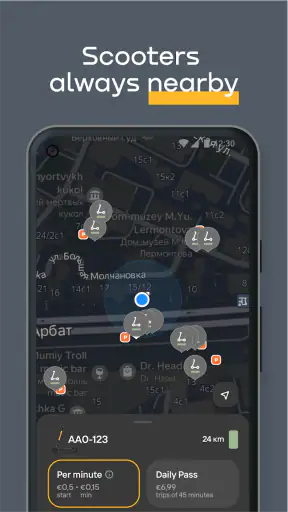
Location is especially important. If the map does not place me where I expect, I avoid selecting the first scooter shown. I refresh my position, look at nearby streets, and compare the map with what I can actually see. A marker can be close while the scooter is around a corner, inside a courtyard, or on the opposite side of a busy road. Walking directly to the pin without checking the surroundings wastes time.
Another common sticking point is assuming that every visible vehicle is ready to ride. A scooter may be reserved, already in use, difficult to reach, or unsuitable because of its physical condition. I inspect the vehicle before committing to the trip. If something looks damaged or unstable, choosing another one is wiser than trying to solve the problem after starting the rental.
The app is most convenient for spontaneous journeys, but I would not rely on it as the only option when arriving at an appointment with no spare time. Scooter availability can change while walking to a pickup point. For a tight schedule, I check the map before leaving and keep a public transport or walking alternative in mind.
Whoosh is also not the right choice for every rider. Someone who dislikes balancing in traffic, needs to carry bulky luggage, or is travelling in poor weather will probably be better served by a car, taxi, bus, or train. The app can make a short trip easier, but it cannot change the limitations of a small two-wheeled vehicle.
What I check before starting a ride
My most useful habit is separating app problems from vehicle problems. If the map is behaving normally but the scooter is not where expected, I do not repeatedly tap the same button. I first check the street, nearby entrances, and the direction in which the marker is pointing. If the vehicle is present but clearly unsuitable, I move on rather than treating it as a technical challenge.
I also make sure the phone has enough battery for the whole journey. This sounds obvious, yet a scooter app is not like a paper ticket. The phone is needed for access, trip control, and closing the ride. A nearly empty battery creates risk even when the scooter itself is fully charged.
Before riding, I look at the planned destination rather than only the starting point. The practical question is not simply “Can I find a scooter?” but “Can I finish the trip legally and conveniently?” A destination may have crowded sidewalks, restricted parking areas, or no sensible place to leave a vehicle. Thinking about the final few minutes before unlocking is one of the easiest ways to avoid an awkward ending.
I keep the app updated when possible, especially because the current version is 3.18.0 and mobile operating systems change over time. Whoosh supports Android 8.0 and later, which covers many older phones, but compatibility alone does not guarantee a smooth experience on a device with outdated location services or limited free storage. If the app opens slowly or the map behaves strangely, I check the phone itself before blaming the service.
Simple setup checks that prevent avoidable trouble
When a new user cannot get started, I would begin with the basics: a stable internet connection, location enabled, and enough phone power to complete the ride. I would then close and reopen the app if the map appears frozen. If the position is inaccurate, moving to an open area can help the phone establish a better location reading than standing between tall buildings.
I avoid repeatedly pressing buttons while the network is slow. Multiple attempts can make it unclear whether an action has completed or is still waiting. A short pause, followed by checking the current screen carefully, is safer than creating several overlapping requests. This is particularly useful around busy stations or crowded city centres, where mobile connections can feel inconsistent.
It is also worth checking that the selected scooter is physically reachable. A map pin is a guide, not a substitute for looking around. I have found that a few seconds spent identifying the nearest street entrance is more productive than repeatedly zooming in and out.
For a first ride, I prefer a simple route in daylight, with enough room to stop and orient myself. That gives me time to understand the unlock and finish process without the pressure of a crowded commute. Once that routine feels familiar, the app becomes much less intimidating.
Recovering when the normal workflow breaks
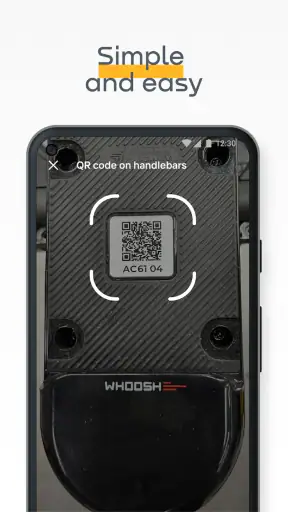
The clean workflow is straightforward: locate a scooter, approach it, unlock it, ride carefully, and end the session in an appropriate place. Recovery matters when one of those steps does not behave as expected. My first rule is to identify the last action that definitely succeeded. If the scooter unlocked but the map has not changed, I do not assume the ride is closed. If the map still shows the vehicle as available, I do not assume the unlock worked.
When the application seems stuck, I check whether the phone has actually changed screens or whether only the visual map has failed to refresh. Switching briefly between screens, waiting for the connection, and reopening the app can clarify the state. I avoid riding away until I am confident that the rental has started correctly.
If a scooter cannot be unlocked, I do not spend several minutes standing beside it while traffic or other users build up around me. I check the connection and location once, then try another available vehicle if one is nearby. That is a practical trade-off: investigating may occasionally save the original choice, but moving to a working scooter is often faster than repeatedly retrying the same action.
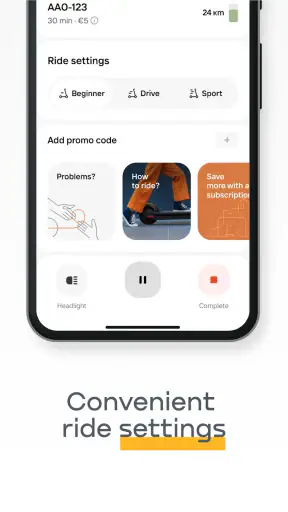
Ending the ride deserves even more attention. I stop in a place where the scooter is not blocking pedestrians, entrances, driveways, or access routes. Then I wait for the app to confirm that the session has finished. I do not walk away immediately after tapping the final control. A short visual check of the app is a small habit that can prevent uncertainty later.
If the app does not appear to recognise the end of the ride, I stay near the scooter and try the basic recovery steps rather than abandoning it. I check the connection, allow the map to refresh, and reopen the app if necessary. If the state remains unclear, I use the support route available inside the service and keep the relevant details ready, such as the scooter location and what I saw on screen. I would not keep riding or leave the vehicle somewhere unsuitable while guessing.
Separating app trouble from city and vehicle conditions
Not every bad experience is caused by Whoosh. A weak mobile signal can affect map updates. Tall buildings can make positioning less precise. A scooter may be physically blocked even though its marker appears nearby. Roadworks, crowds, weather, and local parking conditions can make a perfectly functioning app feel inconvenient.
This distinction matters because the solution changes. Restarting the app will not move a scooter from behind a locked gate, and changing location settings will not make a crowded pavement suitable for parking. I first observe what is happening in the real world, then decide whether the problem is digital, mechanical, or simply a poor trip choice.
The same applies to battery expectations. A scooter-sharing app can help locate a vehicle, but the ride still depends on the actual scooter being ready for use. I prefer not to choose a vehicle that looks neglected or difficult to reach merely because it is the closest marker. A slightly longer walk to a clearly usable scooter is often the better decision.
Safety is another area where personal judgement remains essential. Whoosh makes access to a scooter convenient, but convenience should not encourage hurried riding. I choose routes that match my confidence and local conditions, slow down around pedestrians, and avoid treating the app’s map as a guarantee that every road is comfortable for a scooter.
Who benefits most from Whoosh?
The strongest use case is the short urban connection that is awkward on foot but too brief to justify a car. For example, I might leave a train station, find that the final part of the journey takes twenty minutes on foot, and use a Whoosh scooter to cover that gap. The app is useful when I already know the general area, can identify a sensible parking point, and have enough time for a quick vehicle check.
It can also help when a bus route is indirect or when a destination lies between convenient transit stops. In those situations, the scooter is not replacing an entire transport network; it is filling a specific gap. That is where I find the service most convincing.
People who make many short trips may appreciate the low commitment of a free app rather than owning, charging, and maintaining a personal scooter. On the other hand, frequent users should still compare the real convenience with their usual alternatives. Walking is cheaper in practical terms and requires no search. A bicycle may be more comfortable for longer distances. Public transport is usually better when carrying bags or travelling in bad weather.
I would skip Whoosh for journeys where the endpoint is uncertain, the route is far beyond a comfortable scooter ride, or the timing is critical and vehicle availability cannot be checked in advance. I would also choose another option for passengers, large items, or anyone who does not feel confident sharing roads and paths with other traffic.
How it compares with ordinary alternatives
Compared with walking, Whoosh saves time over a short-to-medium city distance, but adds setup and parking decisions. Walking wins when the destination is close or the route is crowded. Compared with a personal bicycle, the sharing model removes ownership and maintenance, yet it also means I cannot assume a vehicle will be waiting exactly where I want it.
Compared with public transport, a scooter offers more direct movement and can solve the first- or last-mile problem. A bus or train remains preferable for longer journeys, bad weather, heavy luggage, or times when many people are travelling. Compared with a taxi, Whoosh is a more independent option for riders who are comfortable handling the trip themselves, but a taxi is easier when door-to-door convenience matters more than cost control and personal effort.
That comparison explains the app’s real strength. It is not universally faster or easier. It is particularly good at making a short, flexible urban hop possible without owning a vehicle. The more complicated the journey becomes, the less decisive the advantage is.
My practical verdict after using the service
Whoosh is a focused and approachable choice for short city travel. I like that its purpose is clear and that the free app lowers the barrier to trying scooter sharing. WSH MOBILITY has built a service that can fit naturally between walking and public transport, especially when the route is too long to walk comfortably but too short for a car.
The main lesson from my experience is to plan the finish before the start. Check the map, confirm that the scooter is reachable, keep the phone ready, and wait for the ride to close properly. Those small steps address most of the friction users are likely to notice.
The app’s mature presence is reflected in its broad adoption, while its Everyone content rating makes it accessible as an app category. Still, access to the app should not be confused with suitability for every rider or every trip. The vehicle, street, weather, phone connection, and destination all matter.
For someone who wants an occasional scooter for a practical city connection, I would recommend giving Whoosh a try. I would not present it as a replacement for every transport option, and I would keep a backup plan for important appointments. Used with that realistic expectation, Whoosh is a useful mobility tool rather than a gimmick: quick when the conditions are right, manageable when something goes wrong, and most valuable when it solves one clearly defined part of a journey.


